
Most small businesses do marketing the way people do exercise without a plan: a burst of activity, then nothing, then guilt. A boosted post here, a pamphlet there, a new Instagram page that goes quiet after three weeks. The problem is not effort. It is the absence of a simple plan.
I recommend that every small business owner create a one-page digital marketing plan. One page is enough to give direction, and short enough that you will actually use it. Here is how I build it.
Key takeaways
- A marketing plan starts with one clearly described ideal customer, not with platforms.
- Set measurable goals, such as enquiries per month, and work backwards to activities and budget.
- Choose two or three channels you can run consistently instead of trying to be everywhere.
- Build a simple monthly calendar and review results every month.
- Fix your website, Google Business Profile and follow-up process before spending heavily on ads.
Section 1: Your ideal customer
Describe one specific customer in a few lines. Not "everyone in the city", but something like: "Working parents aged 30–45 in our area who want a reliable after-school tuition centre for children in classes 6–10."
Include where they spend time online, what worries them, and what makes them choose one business over another. Every marketing decision becomes easier once you know exactly who you are speaking to.
Section 2: Your offer and promise
Write your main offer and the promise behind it in one or two sentences. For example: "Small batches of eight students, weekly progress reports to parents, and a free demo week." Your promise should be specific and believable. I explain this further in brand positioning made simple.
Section 3: Your channels
Choose two or three channels — not ten. For most local businesses, a strong starting combination is:
- Google Business Profile for local search and reviews.
- One social platform where your customers are most active, often Instagram or Facebook.
- WhatsApp for enquiries and customer updates.
Add paid ads or a website blog once these are working. Being excellent on a few channels beats being average on many.
Section 4: Your budget
Write down your monthly marketing budget in rupees and how it is split. A simple example:
| Item | Monthly budget |
|---|---|
| Meta ads (local targeting) | ₹6,000 |
| Content creation (photos, video editing) | ₹3,000 |
| Tools and subscriptions | ₹1,000 |
The amount matters less than consistency. A modest budget spent steadily for three months teaches you more than a large budget spent in one week. See my guide on setting a marketing budget.
Section 5: Your content plan
Decide on a small set of content themes that serve your customer. For a tuition centre, themes could be study tips, student success stories (with permission), behind-the-scenes of classes, parent FAQs and exam updates. Then set a realistic frequency — perhaps three posts a week and one short video.
Section 6: Your conversion path
Write the exact steps a customer takes from discovering you to paying you. For example: sees reel → visits profile → clicks WhatsApp → receives automatic reply with fees and timings → books demo class → attends → enrols.
Look for weak points. If people message but do not book, improve your replies. If they attend the demo but do not enrol, improve the demo experience. Often the biggest gains come from fixing this path rather than spending more on ads.
Section 7: Your numbers
Choose four or five numbers to track weekly:
- Number of enquiries and their sources.
- Cost per enquiry (for paid channels).
- Enquiry-to-customer conversion rate.
- Number of new reviews.
- Revenue from new customers.
Track them in a simple sheet. My article on tracking marketing ROI explains each metric.
Section 8: Your 90-day action list
Finally, list ten specific actions for the next 90 days, each with an owner and a deadline. For example:
- Complete Google Business Profile with photos — Week 1.
- Ask 20 existing customers for reviews — Weeks 1–3.
- Set up WhatsApp greeting and quick replies — Week 1.
- Publish three posts weekly — ongoing.
- Run a small local ad test — Weeks 3–6.
- Review numbers every Monday — ongoing.
Review and improve
At the end of 90 days, review what worked and update the plan. Keep the channels and content that brought customers; drop what did not. Marketing improves through cycles of action and learning.
One-page plan template
| Section | What to write |
|---|---|
| Ideal customer | Who they are, what they need, where they spend time |
| Offer | What you sell, why it is better, price or starting price |
| Goal | Measurable target, e.g. 40 qualified enquiries per month |
| Channels | Two or three priority channels and why |
| Content | Themes and formats for each channel |
| Budget | Monthly spend on ads, tools and content |
| Follow-up | How enquiries are captured and answered |
| Metrics | Numbers reviewed every month |
A 90-day rollout
Month one focuses on foundations: positioning, website fixes, Google Business Profile, WhatsApp setup and tracking. Month two launches consistent content and a small paid test on one channel. Month three reviews results, scales the best-performing channel and improves conversion with better offers and follow-up. This sequence prevents the common mistake of spending on ads before the business is ready to convert the attention.
Review questions each month
Which channel brought the most qualified enquiries? What did each enquiry cost? Which content performed best and why? Where did leads drop off? What one change will we test next month? Writing down answers builds a valuable record of what works for your business.
A 7-step one-page plan builder
- Write one measurable goal for the next ninety days, such as a target number of leads.
- Describe your ideal customer and where they spend time online.
- Choose two primary channels instead of trying to be everywhere.
- Plan weekly content and one offer or campaign per month.
- Set a monthly budget for ads, tools and content production.
- Define the metrics you will track and how often.
- Book a monthly review to adjust the plan based on results.
Frequently asked questions
How much should a small business spend on marketing?
It varies by industry and growth goals. Start with a modest, sustainable budget, measure returns and increase spending on channels that prove profitable.
Do I need a website if I have social media?
Yes. A website gives you control, credibility and search visibility, and it converts visitors better than social profiles alone.
How long before marketing shows results?
Paid ads can bring enquiries within days; SEO and content usually take months. A good plan combines both.
Should I hire an agency or do it myself?
Many owners start themselves to learn the basics, then hire help for specialised work like ads, SEO or video production.
Should I hire an agency or do marketing myself?
Start yourself to learn what works, then hire specialists or an agency for tasks that need more time or skill than you have.
Final thought
A one-page plan turns marketing from random activity into a system. It keeps you focused when every new trend tempts you to change direction. Print it, stick it on your wall and look at it every week. For managed help, explore Viral In City, and read more about my approach on the marketing expert page.
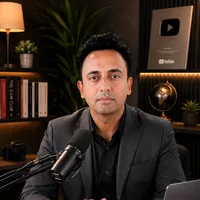
Jitendra Wadhwani
Global Entrepreneur · AI & Tech Expert · Digital Marketing & SEO · International Business Coach
Jitendra Wadhwani is an Indian businessman and global entrepreneur who leads HYRAX COMMUNICATION PVT LTD, a 15 years trusted company, and its ventures DND Teams, Viral In City and A Property Agency. He works as an AI and tech expert, digital marketing, social media and SEO expert, international business coach, trainer and YouTuber, serving clients and audiences across India, the USA, UK, UAE, Europe and worldwide. Everything he writes comes from hands-on work with real businesses, creators and learners.